In 2026, B2B lead generation on Google Maps has evolved from a tedious manual process into one of the highest-ROI prospecting strategies available to sales teams. With over 200 million businesses indexed globally, Google Maps is a goldmine if you know how to mine it efficiently.
This guide covers the exact six-step workflow used by top outbound teams: defining your ICP, searching with precision, qualifying by social proof, extracting enriched contacts, organising your list, and sending personalised sequences that convert. If you are evaluating enterprise tools like Apollo.io for this workflow, read our Apollo.io alternatives for small businesscomparison first. Let's go.
Related guides
Why Google Maps is a Hidden B2B Lead Machine
Most B2B marketers think of Google Maps as a consumer tool. That's a mistake. Every business that claims a Google Maps listing is essentially raising their hand and saying: "We exist, we have customers, and here is how you can reach us."
Here's what makes it particularly powerful for B2B prospecting:
- Verified intent: Businesses that maintain active listings are operationally healthy and customer-facing, which is perfect for B2B service providers.
- Rich metadata: Each listing typically includes business name, category, address, phone number, website, hours, photos, and customer reviews.
- Social proof baked in: Star ratings and review counts let you qualify lead quality before you ever send a message.
- Hyper-local targeting: You can focus on a single neighbourhood, city, metro area, or state, making outreach feel genuinely local.
- Always fresh: Google Maps is continuously updated by businesses and users, so the data is more current than most purchased lead lists.
Stat: According to BrightLocal, 98% of consumers used the internet to find a local business in 2025, and Google Maps was the primary discovery channel. That same infrastructure is your B2B lead database.
Step 1: Define Your Ideal Customer Profile (ICP)
Before opening Google Maps, spend 20 minutes getting crystal clear on who you're targeting. Unfocused prospecting wastes your time and dilutes your outreach quality.
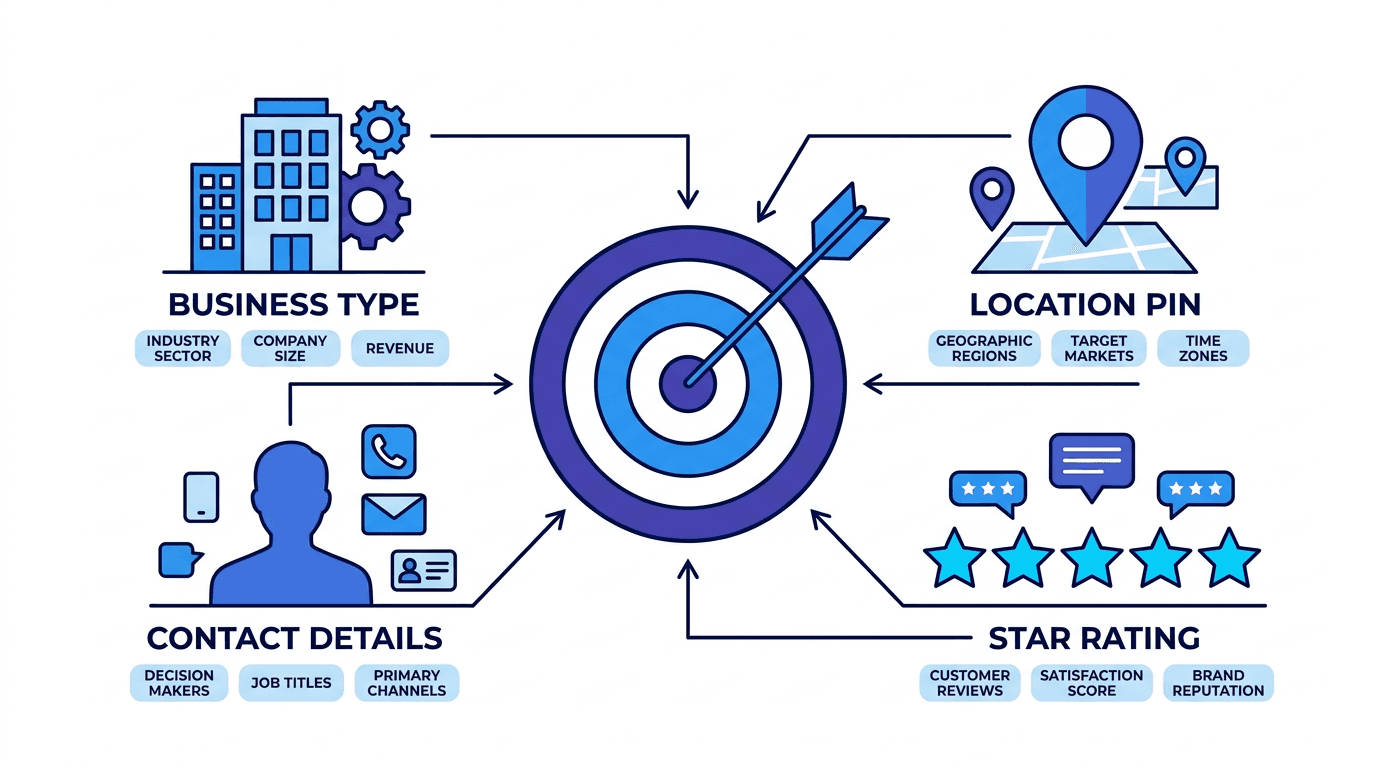
The four pillars of a strong ICP for Google Maps prospecting.
Your ICP for Google Maps prospecting should cover:
- Business category: What type of business are you selling to? (e.g. dental clinics, gyms, law firms, restaurants, auto shops)
- Target geography: Which city, region, or radius? Start small, one city is easier to dominate than a whole country.
- Minimum quality bar: What star rating do you require? Businesses rated 4.0+ are typically stable and customer-focused.
- Company size signal: Review count can proxy for business size, 50+ reviews often means an established operation.
- Pain point fit: Does your product solve a real problem for this category? Write it down before you prospect.
Example ICP: Dental practices in Austin, TX with 4.2+ stars, 30+ Google reviews, and an active website. These are established clinics with revenue to invest in growth tools.
Step 2: Search by Category and Location
Open Google Maps and type your category + location into the search bar. The format category + city consistently returns the most relevant results. For example:
dental clinics Austinpersonal injury lawyers Chicagogyms and fitness studios Miamiaccounting firms Seattle
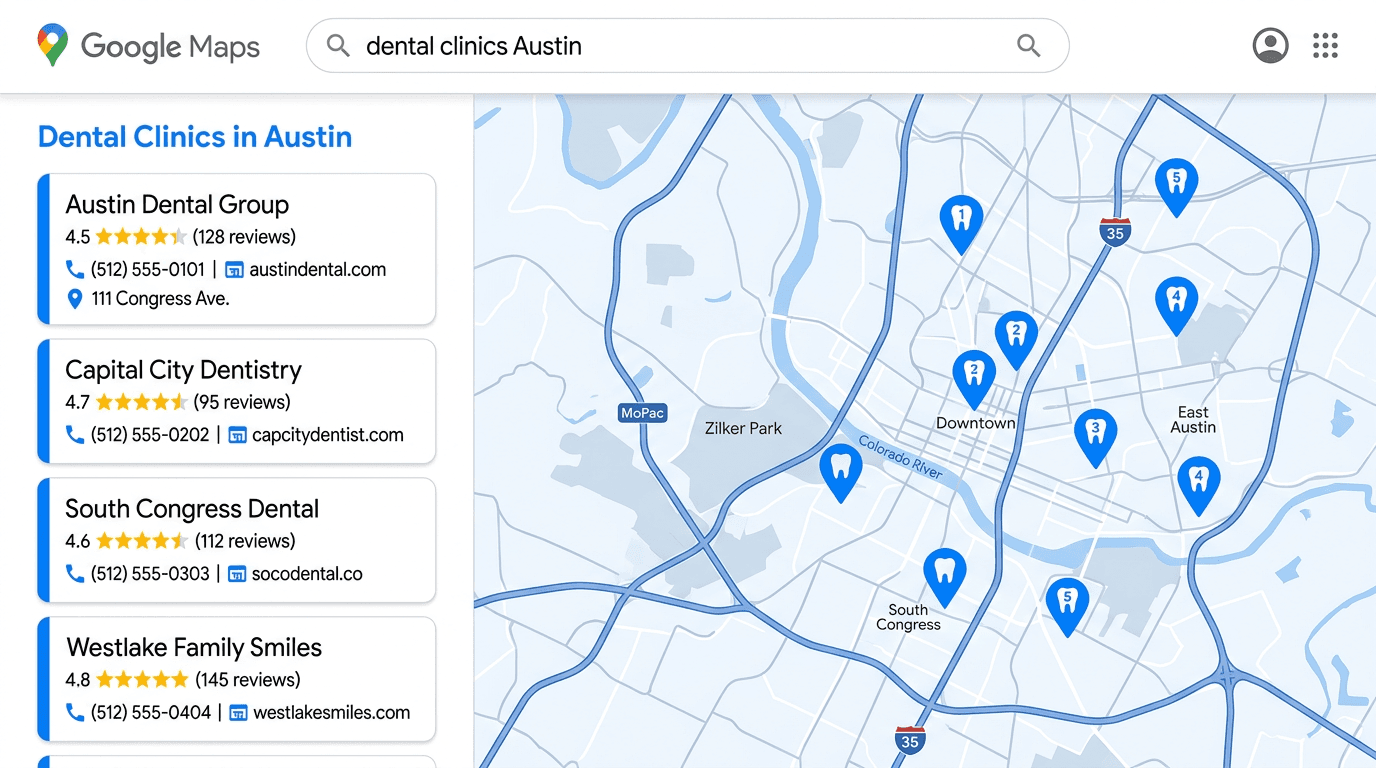
A typical Google Maps search returns dozens of qualified prospects with contact details visible.
Pro tips for better search results
- Use Google's category system: Try both the generic term ("dentist") and a more specific variation ("cosmetic dentist") to expand coverage.
- Zoom in: A more zoomed-in map view shows denser results for a specific neighbourhood, useful in large cities.
- Use filters: Google Maps' "Filters" button lets you narrow by open hours, ratings, and more.
- Iterate the search: Run the same category across adjacent cities, neighbouring markets are often underserved by competitors.
At this stage, you're building a raw list. Don't worry about contact details yet, just get volume. A typical search in a mid-sized US city returns 40–200+ qualified prospects.
Step 3: Qualify Leads by Rating and Reviews
Not every pin on the map is worth reaching out to. Filtering by quality before you invest time in outreach is the single biggest efficiency gain in this workflow.
The 3-layer qualification filter
- Star rating ≥ 4.0: Businesses below 4 stars may be dealing with service or management problems, which is not ideal for a long-term client relationship.
- Review count ≥ 20: A business with fewer than 20 reviews may be brand new, inactive, or have a limited customer base.
- Active web presence:A listed website signals the business is investing in its own growth, and they're more likely to invest in your product.
Why this matters: Outreach sent to well-established businesses converts at 3–5× the rate of cold outreach to low-rated or inactive listings. Quality over quantity always wins in B2B.
Once filtered, your raw list of 200 businesses might narrow to 80–120 high-quality targets. That is still a substantial pipeline, and one where every contact is genuinely worth pursuing.
Step 4: Extract and Enrich Contact Information
Google Maps shows a business's phone number and website, but to run effective B2B outreach you need more: a direct email address, the decision-maker's name if possible, and a clear understanding of how they communicate.
What data to collect
- Business name and category, for personalised first lines
- Phone number, for SMS outreach
- Website, check their homepage for contact forms, team pages, or direct email formats
- Email address, often found in the website's contact page, footer, or LinkedIn
- Owner / decision-maker name, personalising by name increases reply rates significantly
- Location and city, reference local context in your first line ("I saw you're based in the South Congress area…")
Manual vs. automated enrichment
Manually enriching 100+ leads takes hours. In 2026, the most efficient teams use tools that automate this step: searching, extracting, and enriching multiple fields simultaneously at scale.
LeadLu does this in one step: paste your search criteria, and it returns a pre-enriched list with business name, location, rating, website, phone, and email, ready to import or act on immediately.
Step 5: Organise Into a Follow-Up List
Leads in a spreadsheet are just data. Leads in an organised, actionable list become a pipeline. Before you send a single message, set up your list structure:
- Group by campaign: Keep your "Austin Dental Clinics (April 2026)" list separate from your "Miami Gyms (May 2026)" list. Mixing targets leads to generic messaging.
- Tag by priority: Flag the top 20% of leads (4.8+ rating, large review count, active socials) for personalised manual outreach before running automated sequences.
- Record your first-contact notes: A quick note on why you chose this lead ("Just opened second location", "Mentions new marketing budget on website") will make your outreach much more compelling.
- Set a follow-up cadence: Decide upfront how many touchpoints you'll make: e.g. Day 1 email → Day 4 follow-up → Day 9 last touch.
If you're using a CRM or outreach tool, import your enriched list now so you can launch sequences directly from the same workspace.
Step 6: Launch Personalised Outreach Sequences
This is where all the preparation pays off. Generic cold email gets ignored. Personalised, locally-relevant outreach gets replies.
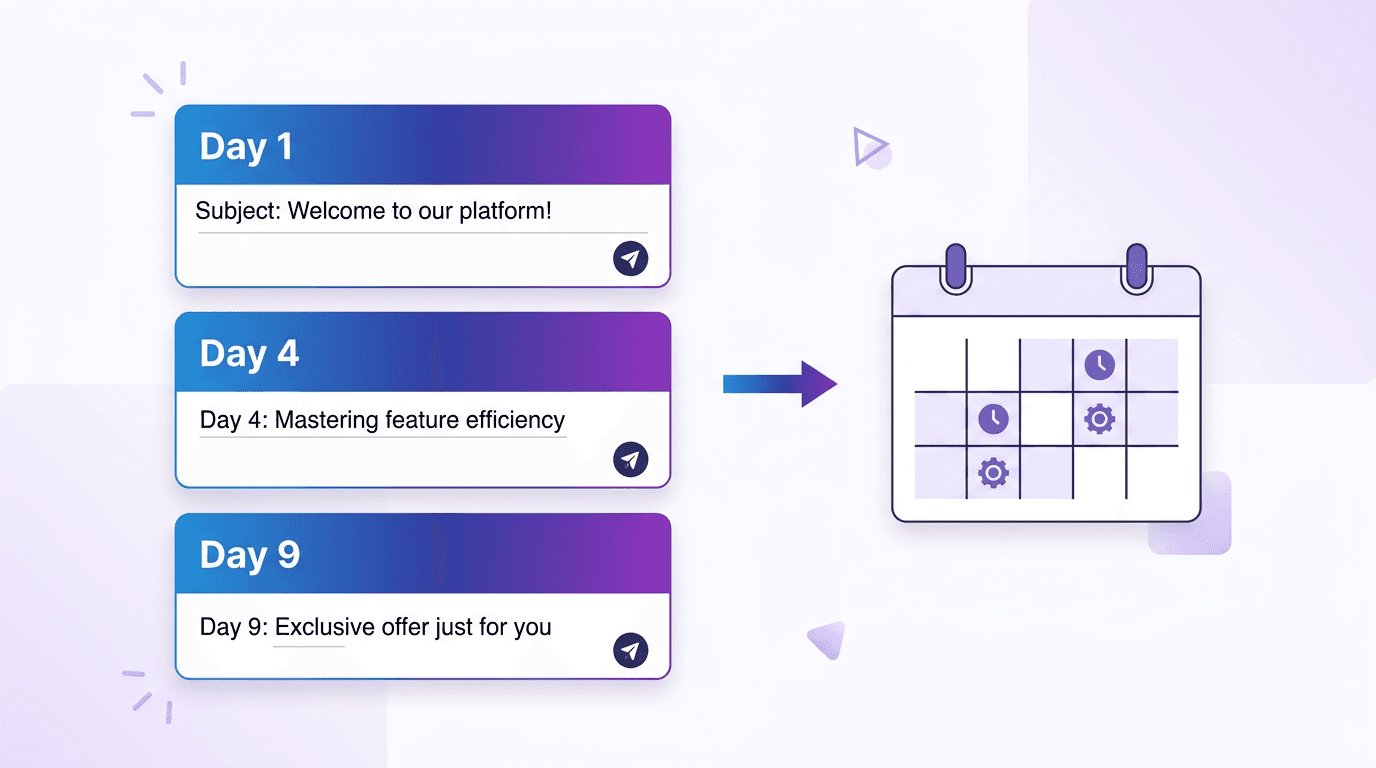
A three-step email sequence dramatically increases your chances of getting a reply.
Email sequence structure that works in 2026
- Day 1: Intro email. Short, personal, no attachments. Reference their business name, city, and one specific detail (their review rating, a recent photo, their niche). One clear CTA: a question or a calendar link.
- Day 4: Follow-up. A brief bump on your last email. Add a single piece of value: a relevant statistic, a short case study, or a genuine compliment on their business.
- Day 9: Last touch. Keep the door open without pressure. "Closing the loop: if timing isn't right, happy to reconnect whenever." Many replies come on the third touch.
Personalisation variables that drive replies
{{first_name}}, even "Hi there" beats "Dear Business Owner"{{business_name}}, always include it; it signals you've done homework{{city}}, local relevance builds trust instantly{{rating}}, "I noticed you have a 4.8 rating, impressive for a practice your size"{{category}}, tailor your pain-point framing to the specific industry
Adding SMS for a multi-channel boost
In 2026, email alone is no longer enough to break through in crowded inboxes. Adding a single SMS on Day 2 or Day 5 ("Hey {first_name}, sent you a quick email about {business_name}. Did you get a chance to look?") can increase total reply rate by 2–3×.
How to Scale This Workflow 10× Faster with LeadLu
The six steps above describe the ideal manual workflow. In practice, manually working through them for 100 leads takes 10–15 hours per campaign. LeadLu compresses that to under 30 minutes.
Search & Enrich in One Step
Type your category and city. LeadLu returns a pre-enriched list with ratings, emails, phone numbers, and websites, no manual digging.
Save to Lists Instantly
Click to save any lead into a named list. Filter, tag, and prioritise without spreadsheets.
Built-In Email Sequences
Build Day 1 → Day 4 → Day 9 follow-ups with merge fields in minutes. Sequences run automatically after you launch.
SMS Outreach Built In
Send personalised SMS campaigns alongside email from the same workspace. True multi-channel in one tool.
Pipeline Tracker
Move leads from New → Opened → Replied → Won in a Kanban board. Never lose track of a warm conversation.
Start with a Free Trial
300 leads and 50 saved leads on the Starter plan, with a 1-day free trial to prove the workflow before committing.
Frequently Asked Questions
Can you use Google Maps for B2B lead generation?
Yes. Google Maps indexes millions of verified local businesses with ratings, contact details, and categories, which makes it one of the richest free sources of B2B leads, especially for service-based industries like dental, legal, fitness, and food service.
Is scraping Google Maps legal?
Scraping Google Maps directly using unauthorised automated tools may violate Google's Terms of Service. Tools like LeadLu access business data through compliant methods, enriching publicly available information without violating platform rules.
How many leads can I get from Google Maps?
Google Maps indexes over 200 million businesses globally. In any mid-sized US city, a single category search typically returns hundreds to thousands of qualified local businesses.
What's the best outreach cadence for cold B2B leads?
A three-touch sequence (Day 1 intro, Day 4 follow-up, Day 9 last touch) is the industry standard for cold B2B outreach and consistently outperforms single-email campaigns. Adding a single SMS on Day 2 or Day 5 further increases reply rates.
What is the best tool to find B2B leads on Google Maps in 2026?
LeadLu is purpose-built for this workflow: search by category and location, enrich with contact data, save to a follow-up list, and launch email or SMS sequences all from one workspace.
Conclusion
Google Maps is one of the most powerful, underused B2B lead databases in 2026. When you combine precise ICP targeting, quality-first filtering, enriched contact data, and personalised multi-touch outreach, you get a repeatable system that converts cold prospects into paying clients, without buying an expensive lead list or building a massive team.
The six steps above give you the framework. LeadLu gives you the infrastructure to execute it at scale: search, enrich, organise, and reach out from a single workspace, starting at just $9/mo with a 1-day free trial. Web designers using this workflow to find local clients should also read our guide on finding web design clients without Upwork or Fiverr.
Start your first Google Maps campaign today and have your first leads in your pipeline by end of day.
Keep reading
Now that you know how to find B2B leads on Google Maps, these guides help you close the loop on outreach and client acquisition: